Key decisions
Before implementing your e-commerce integration, you need to make several architectural decisions that will affect your entire implementation. This guide helps you understand the trade-offs and make informed choices.
Decide on the User ID
User.com tracks customers by associating all events and data with a unique identifier. This identifier links frontend browsing behavior to backend transactions, creating unified customer profiles across devices and sessions.
We recommend: Email-based identification
Use the contact's email address as your User ID. You have two options:
Option A: Lowercase email (recommended)
email: John.Doe@Example.com → User ID: john.doe@example.com
Option B: SHA-256 hashed email
email: john.doe@example.com → User ID: 6a7b8c9d...
Why email-based identification works best:
- Universal availability — Email exists at every touchpoint: logged-in sessions, guest checkouts, form submissions, backend orders, CSV imports
- Cross-device consistency — The same email produces the same identifier regardless of device or channel
- No database dependency — You don't need to synchronize internal database IDs across systems
Lowercase email is the simplest approach — it's readable, easy to debug, and requires no transformation beyond lowercasing. The hashed version adds privacy protection by preventing raw email addresses from appearing in logs, network requests, and browser tools, but adds implementation complexity.
Trade-off to consider: If a contact changes their email in your system, you'll need to merge their profiles in User.com.
Alternative: Database ID
If your architecture requires it, you can use your internal user/customer ID from your database. This approach requires:
- Exposing or synchronizing your database IDs across all integration points
- A fallback strategy for guest checkouts (where no database ID exists yet)
Use your User ID consistently everywhere
Whatever you choose, send the same identifier across all channels:
- Frontend JS API
- Backend REST API
- Mobile SDK
- CSV imports
Inconsistent identifiers create duplicate profiles and fragment your customer data.
Field naming reference
The User ID field has different names depending on the platform:
| Field name | Platform | Notes |
|---|---|---|
user_id | JS API | Frontend tracking |
custom_id | REST API | When contact is the main entity |
user_custom_id | REST API | When another entity (deal, event) is the main reference |
userId | iOS SDK, Flutter SDK | Mobile tracking |
id | Android SDK | Mobile tracking |
Decide on the Product ID
User.com allows using your own Product ID for making sure product interactions and updates are tracked on the same profile, even when there are multiple sources: product feed, EEC events, transactions, and CSV imports.
Decide what is the main source of the Product ID. Is it SKU, e-commerce ID, or maybe EAN? Make sure you're able to provide it among all data sources—especially if you want to integrate more contexts (e.g., e-commerce + offline purchase).
Decide how deep you want to go into the product tree
You need to decide on the product structure you want to track and use a consistent hierarchy among all data sources.
For products that have no variants (no item_group_id) there is no discussion. But everywhere we have a product family, it's important to make a proper decision based on:
- Technical capabilities — How are current dataLayer and product feeds configured?
- Business needs — What marketing automation segments and flows do you want to build?
Option A: Use only configurable/parent products
No matter if the contact chooses the size or color of the product, you keep tracking their interactions with the configurable/parent product.
product_id = item_group_id
Benefits
- Better for recommendations
- Model training (easier to train the model and find direct patterns)
- Serving the recommendations ("This T-shirt" not "This T-shirt, red, size 35")
- Smaller product feed
Disadvantages
- Hard to define availability and price at the parent level
Option B: Use only variant products
Track every product interaction on the level of variant.
Benefits
- Detailed product information
- Availability and price defined on the variant level
Disadvantages
- Hard to build proper recommendations
- Some interactions (e.g., product view) may not include the variant information
Define the deals (orders) pipeline
Define how granularly you want to track your orders progress. Choose the approach that matches your business needs:
Simple synchronization
A minimal setup with just one status:
- placed
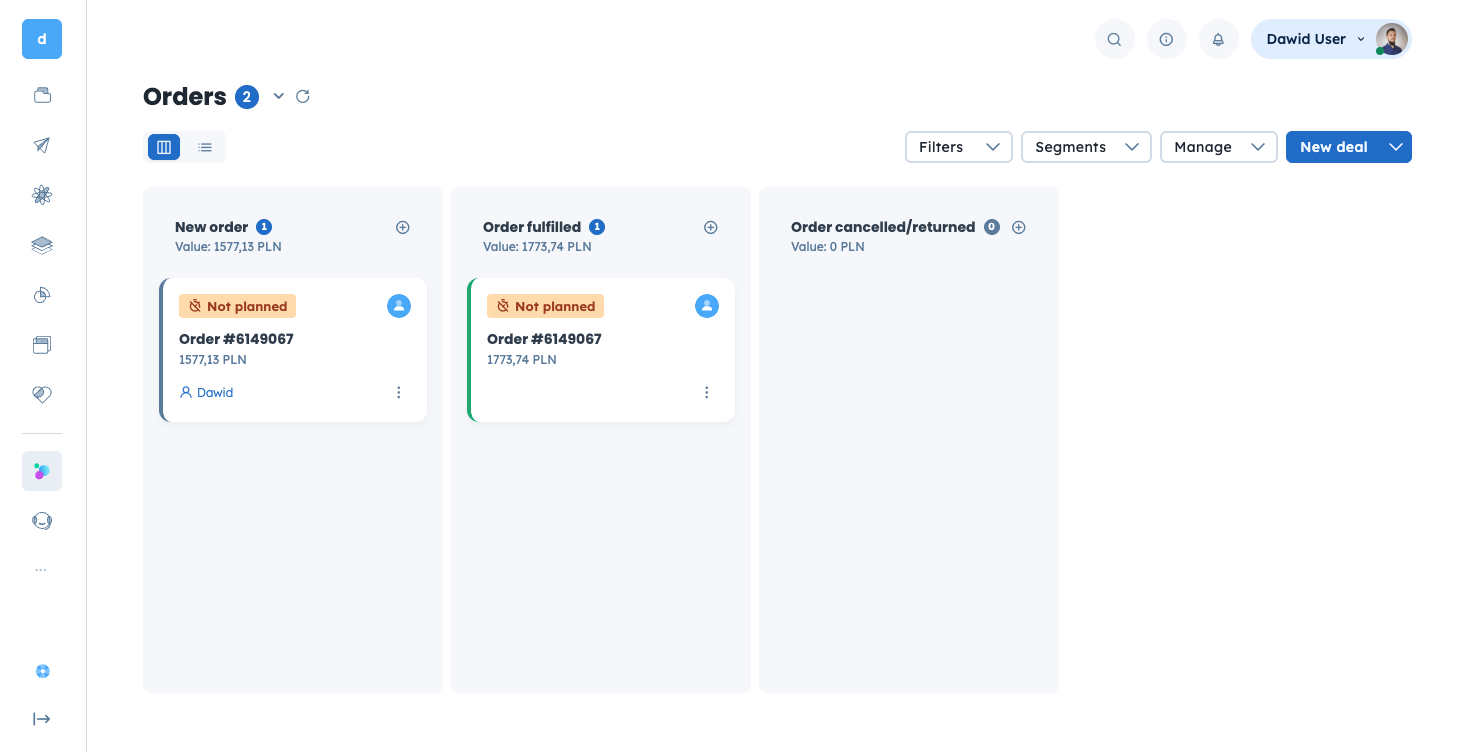
Recommended status tracking
The balanced approach we recommend for most implementations:
- placed — stops processes like abandoned cart
- fulfilled — we calculate LTV based on these, we run post-purchase scenarios based on these
- cancelled — indicates that the order is no longer
placednorfulfilled
Custom, detailed status tracking
For businesses that need granular order lifecycle tracking:
- placed online
- placed offline
- paid
- sent
- delivered
- cancelled
- returned
Trade-offs
More statuses means:
More data
- Deeper segmentation and profiling
- More automation scenarios possible
More data to handle
- More complicated service
- Infrastructure load
- Possible errors
paid can have different payment_method, delivery_method, and expected_delivery_date or delivery_status.Stage is one of the key deal (order) characteristics but not the only dimension we use.
Next steps
Once you've made these key decisions, document them for your team and proceed to the implementation:
- Product catalog sync — Sync your product catalog with User.com
- Frontend integration — Implement browser-side tracking