 User.com REST API Docs
 # Order Tracking
Order data is the backbone of revenue attribution, customer lifetime value calculations, and post-purchase automations. Backend integration ensures every transaction is accurately recorded with full product details.
# How orders work in User.com
Orders in User.com are represented as Deals—configurable entities that track value, status, and related products over time. Each order synchronization involves up to three components:
- Deal — The order itself, with value, stage, and product associations
- Event — A conversion event for analytics and automation triggers
- Product events — Per-SKU events that feed recommendations and segmentation
# Prerequisites
Before implementing order tracking:
- User ID strategy — Defined in Key decisions → Decide on User ID
- Order pipeline strategy — Decided in Key decisions → Define the deals pipeline
# Configure order stages
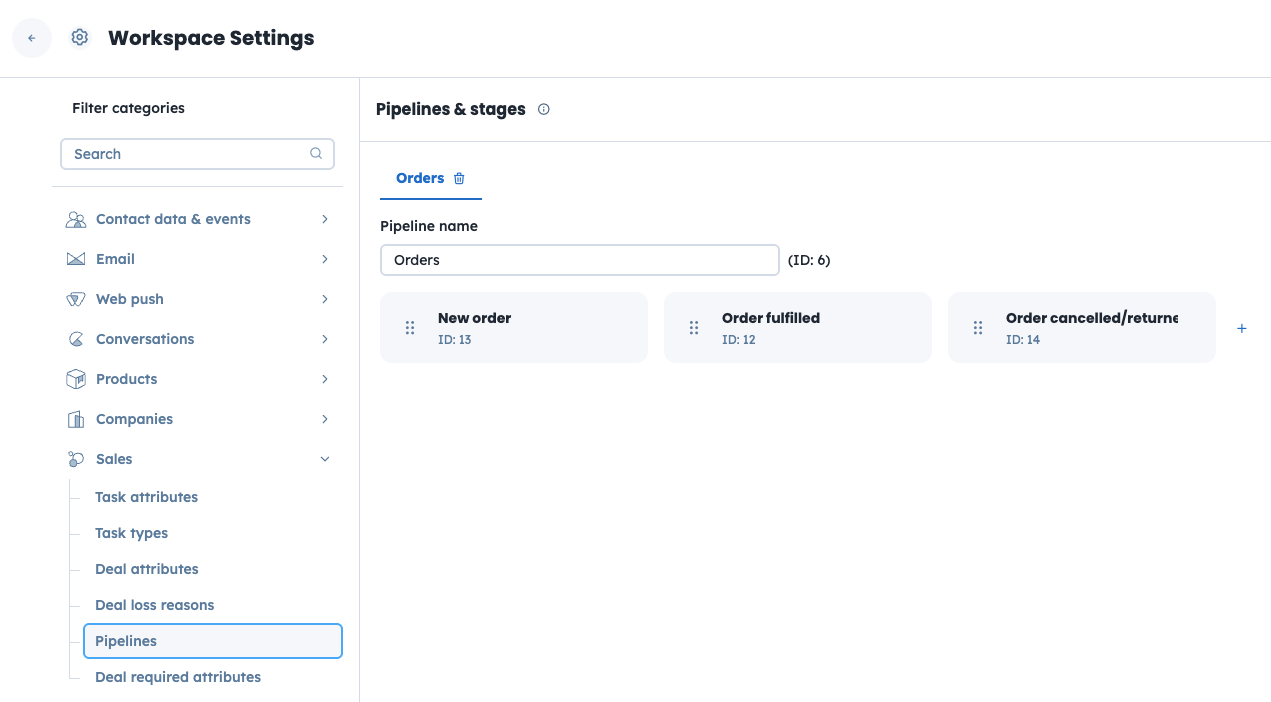
Create your order pipeline in User.com before syncing orders:
- Go to Settings → Workspace Settings → Sales → Pipelines
- Create a pipeline named "Orders" (or your preferred name)
- Add stages matching your order lifecycle (e.g., "New order", "Order fulfilled", "Order cancelled/returned")
- Note the stage IDs — you'll need these for API calls
# Configure deal attributes
Define custom attributes for your orders:
- Go to Settings → Workspace Settings → Sales → Deal attributes
- Create attributes for any custom data you want to track (e.g.,
delivery_cost,discount_amount,payment_method) - Set appropriate data types (float for monetary values, string for codes, etc.)
# Implementation: Creating orders
When an order is placed, create the deal and associated events. The exact timing depends on your pipeline strategy.
# Step 1: Ensure contact exists
Every order must be associated with a contact. Use update_or_create to ensure the contact exists. Since orders typically include customer details, pass all available data:
curl -X POST "https://<your_app_subdomain>.user.com/api/public/users/update_or_create/" \
  -H "Authorization: Token <your_64_char_api_key>" \
  -H "Accept: */*; version=2" \
  -H "Content-Type: application/json" \
  -d '{
    "custom_id": "john@example.com",
    "email": "john@example.com",
    "first_name": "John",
    "last_name": "Doe",
    "phone": "+1234567890"
  }'
The custom_id is the user's lowercase email address. See Key decisions → Decide on User ID for the recommended identification strategy.
Response: 200 OK with contact ID
Marketing consents
Do not include marketing consent fields (email_consent, sms_consent) in order sync requests. Consent management has its own dedicated flow with Double Opt-In handling and reverse sync requirements. See Marketing consents for the proper implementation.
# Step 2: Create or update the deal (order)
Use the update_or_create endpoint—it handles both new orders and updates:
curl -X POST "https://<your_app_subdomain>.user.com/api/public/deals/update_or_create/" \
  -H "Authorization: Token <your_64_char_api_key>" \
  -H "Accept: */*; version=2" \
  -H "Content-Type: application/json" \
  -d '{
    "custom_id": "ORD-78523",
    "user_custom_id": "john@example.com",
    "name": "Order #78523",
    "stage": 13,
    "status": 1,
    "value": 149.90,
    "currency": "USD",
    "products_custom_id": ["SKU-HEADPHONES-BLK", "SKU-CASE-001"],
    "order_products": [
      {
        "product_custom_id": "SKU-HEADPHONES-BLK",
        "value": 129.90,
        "currency": "USD",
        "quantity": 1
      },
      {
        "product_custom_id": "SKU-CASE-001",
        "value": 20.00,
        "currency": "USD",
        "quantity": 1
      }
    ]
  }'
Response: 200 OK with deal ID
# Deal attributes reference
| Attribute | Type | Description |
|---|---|---|
custom_id | string | Your order ID (e.g., ORD-78523). Must be unique across all orders. |
user_custom_id | string | The contact's custom_id (lowercase email recommended) |
name | string | Display name. We recommend Order # + order ID |
stage | integer | Stage ID from your pipeline configuration |
status | integer | 1 = in progress, 2 = won, 3 = lost |
value | float | Total order value |
currency | string | ISO currency code (e.g., USD, EUR, PLN) |
products_custom_id | array | List of product IDs in the order |
order_products | array | Detailed product breakdown with quantities and values |
# Optional attributes
Add custom attributes for richer order data:
{
  "custom_id": "ORD-78523",
  "user_custom_id": "john@example.com",
  "name": "Order #78523",
  "stage": 13,
  "status": 1,
  "value": 149.90,
  "currency": "USD",
  "delivery_cost": 9.99,
  "discount_amount": 15.00,
  "discount_code": "SUMMER15",
  "payment_method": "credit_card",
  "shipping_method": "express",
  "products_custom_id": ["SKU-HEADPHONES-BLK"],
  "order_products": [
    {
      "product_custom_id": "SKU-HEADPHONES-BLK",
      "value": 129.90,
      "currency": "USD",
      "quantity": 1
    }
  ]
}
# Step 3: Create product events
For each product in the order, create a product event. These events feed the recommendations engine and enable product-based segmentation.
curl -X POST "https://<your_app_subdomain>.user.com/api/public/products-by-id/SKU-HEADPHONES-BLK/product_event/" \
  -H "Authorization: Token <your_64_char_api_key>" \
  -H "Accept: */*; version=2" \
  -H "Content-Type: application/json" \
  -d '{
    "user_custom_id": "john@example.com",
    "event_type": "order"
  }'
Response: 201 Created
Repeat for each unique product in the order.
# Step 4: Create conversion event (on fulfillment)
Create a conversion event when the order is fulfilled. This event feeds User.com's conversion analytics and can trigger post-purchase automations:
curl -X POST "https://<your_app_subdomain>.user.com/api/public/users-by-id/john@example.com/events/" \
  -H "Authorization: Token <your_64_char_api_key>" \
  -H "Accept: */*; version=2" \
  -H "Content-Type: application/json" \
  -d '{
    "name": "purchase_completed",
    "data": {
      "order_id": "ORD-78523",
      "value": 149.90,
      "currency": "USD",
      "items_count": 2
    }
  }'
Response: 201 Created with event ID
# Implementation: Updating orders
When order status changes, update the deal to reflect the new stage.
# Moving to fulfilled
When an order is fulfilled:
curl -X POST "https://<your_app_subdomain>.user.com/api/public/deals/update_or_create/" \
  -H "Authorization: Token <your_64_char_api_key>" \
  -H "Accept: */*; version=2" \
  -H "Content-Type: application/json" \
  -d '{
    "custom_id": "ORD-78523",
    "stage": 12,
    "status": 2
  }'
stage: Your "fulfilled" stage IDstatus:2(won) — marks the order as successfully completed
Create purchase product events for each product in the order:
curl -X POST "https://<your_app_subdomain>.user.com/api/public/products-by-id/SKU-HEADPHONES-BLK/product_event/" \
  -H "Authorization: Token <your_64_char_api_key>" \
  -H "Accept: */*; version=2" \
  -H "Content-Type: application/json" \
  -d '{
    "user_custom_id": "john@example.com",
    "event_type": "purchase"
  }'
# Moving to cancelled
When an order is cancelled:
curl -X POST "https://<your_app_subdomain>.user.com/api/public/deals/update_or_create/" \
  -H "Authorization: Token <your_64_char_api_key>" \
  -H "Accept: */*; version=2" \
  -H "Content-Type: application/json" \
  -d '{
    "custom_id": "ORD-78523",
    "stage": 14,
    "status": 3
  }'
stage: Your "cancelled" stage IDstatus:3(lost) — marks the order as unsuccessful
# Handling returns
Returns require different handling depending on whether the entire order or only part of it is returned.
# Partial returns
When only some items are returned, update the deal value but keep the current stage:
curl -X POST "https://<your_app_subdomain>.user.com/api/public/deals/update_or_create/" \
  -H "Authorization: Token <your_64_char_api_key>" \
  -H "Accept: */*; version=2" \
  -H "Content-Type: application/json" \
  -d '{
    "custom_id": "ORD-78523",
    "value": 129.90
  }'
The order remains on its current stage (e.g., "fulfilled" with status "won") but reflects the adjusted value.
# Full returns
When the entire order is returned, update both the value and move to the cancelled/returned stage:
curl -X POST "https://<your_app_subdomain>.user.com/api/public/deals/update_or_create/" \
  -H "Authorization: Token <your_64_char_api_key>" \
  -H "Accept: */*; version=2" \
  -H "Content-Type: application/json" \
  -d '{
    "custom_id": "ORD-78523",
    "stage": 14,
    "status": 3,
    "value": 0
  }'
# Sync flow examples
# Simple flow (recommended for most implementations)
Sync orders at a single point—when placed or when fulfilled:
On order placed:
- Create/update contact
- Create deal (
stage= "New order",status= 1) - Create
purchaseproduct events for each SKU - Create
purchase_completedevent
This approach minimizes API calls while capturing the essential data for recommendations and analytics.
Data accuracy limitation
The simple flow does not track unpaid, cancelled, or returned orders. Revenue data and product purchase counts may be inflated if orders fail to complete. Use the detailed flow if you need accurate lifetime value calculations or order status reporting.
# Detailed flow (for advanced tracking)
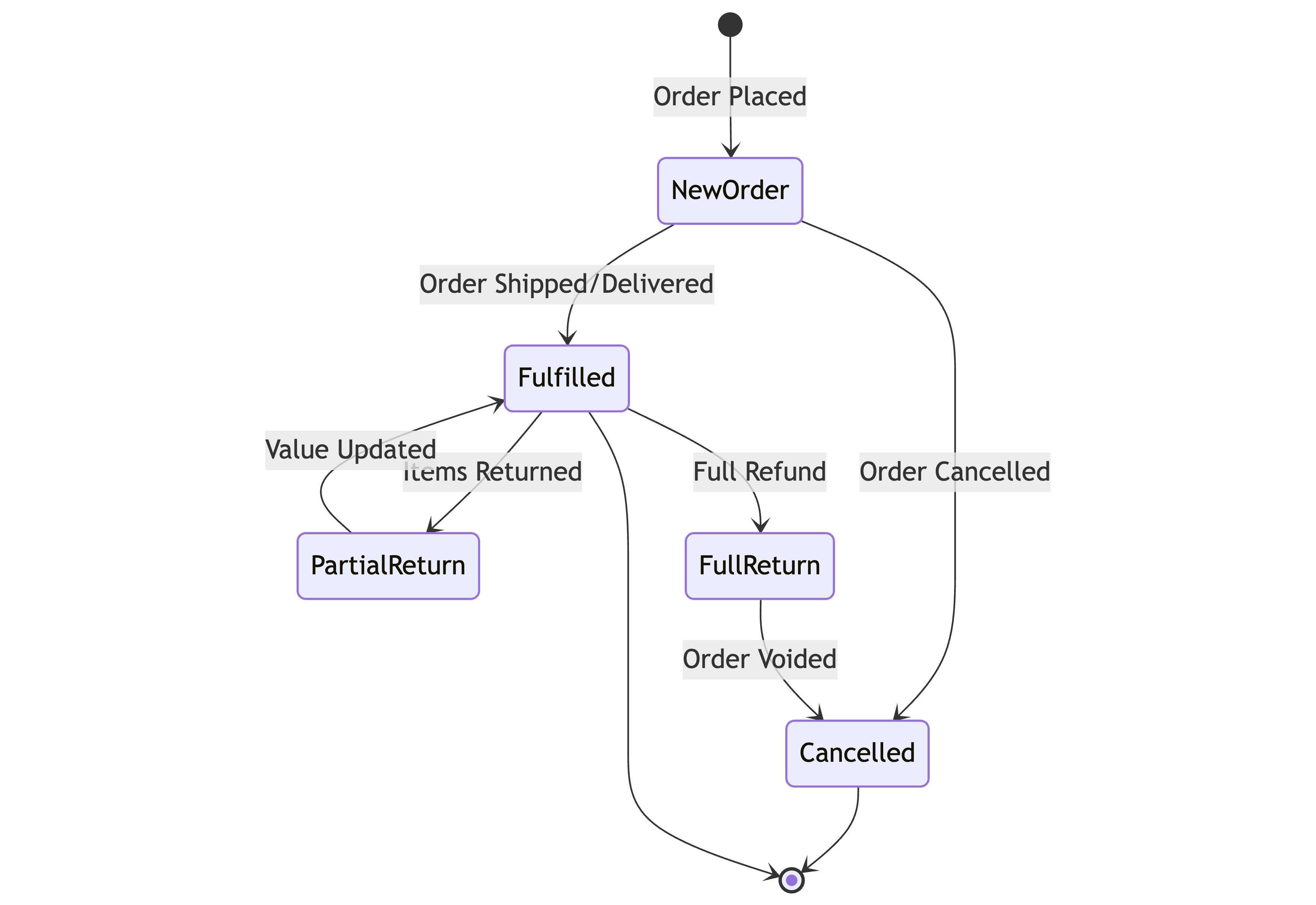
Track the full order lifecycle with multiple sync points:
On order placed:
- Create/update contact
- Create deal (
stage= "New order",status= 1) - Create
orderproduct events for each SKU
On order fulfilled:
- Update deal (
stage= "Order fulfilled",status= 2) - Create
purchaseproduct events for each SKU - Create
purchase_completedevent
On order cancelled/returned:
- Update deal (
stage= "Order cancelled/returned",status= 3)
This approach provides granular tracking but requires more API calls and careful status management.
# Verification
Test your order tracking implementation:
- Deal creation: Check Sales → Deals to verify orders appear with correct data
- Product associations: Confirm products are linked to deals
- Stage transitions: Test moving orders through your pipeline stages
- Events: Verify conversion events appear in contact timelines
- Product events: Check product records show expected event counts
Network monitoring: Filter for /deals/update_or_create/ and /product_event/ requests — expect 200 OK responses.